Cross-Cut vs. Micro-Cut Shredders: What a Home Office Actually Needs
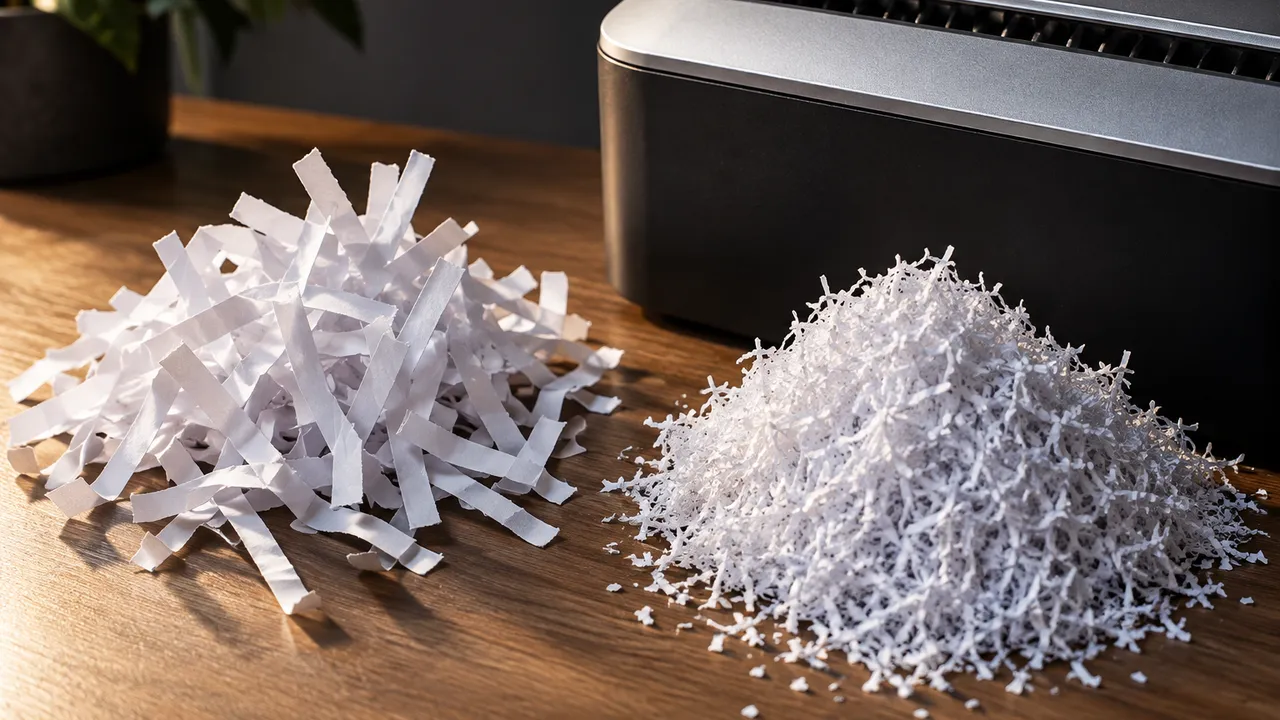
A home-office shredder should make sensitive paperwork unreadable without turning disposal into an afternoon of jams and cooling breaks. Cross-cut models generally produce larger confetti-like pieces; micro-cut models produce smaller particles. But the label alone says little about how quickly a machine clears a stack. The best comparison starts with your typical batch size and the space available for feeding, emptying and storing the machine.
For occasional bills and account statements, practical convenience often matters more than maximum capacity. For years of accumulated records, sustained throughput becomes the deciding factor. Compare the documented security level, realistic feeding load, operating cycle and emptying process—not just the biggest number on the box.
1. Compare particle size, not just marketing labels
Cross-cut and micro-cut are shopping terms, not interchangeable security certifications. Cross-cut machines commonly carry P-3 or P-4 ratings; products advertised as micro-cut often carry P-4 or P-5 ratings. Check the manufacturer's official specifications for both the paper security level and the actual particle dimensions.
A 4-by-35-millimeter particle has an area of 140 square millimeters; a 2-by-12-millimeter particle has an area of 24. These are illustrative sizes, not universal definitions. Smaller pieces generally make reconstruction harder, but no consumer shredder makes information recovery categorically impossible.
The table summarizes particle area, not every requirement behind a security rating; width limits and testing rules also matter. For employer or client documents, check the organization's destruction policy before shopping. A household recommendation does not establish compliance with a contractual or workplace requirement.
| Paper security level | Nominal maximum particle area | Shopping significance |
|---|---|---|
| P-3 | 320 square millimeters | Larger particles; less privacy |
| P-4 | 160 square millimeters | Practical household starting point |
| P-5 | 30 square millimeters | Finer destruction for sensitive records |
2. Treat sheet capacity as a ceiling
Advertised sheet capacity usually describes a maximum under specified conditions, not a comfortable everyday feeding load. Paper weight, folds, staples and mixed materials affect performance. Read the manual's test conditions: a rating based on lighter paper may not translate directly to ordinary US 20-pound copy paper.
Begin below the stated maximum and increase only while feeding remains smooth. For a machine rated around 10 sheets, trying six to eight ordinary sheets is a reasonable starting approach, not a guaranteed capacity. A slowing motor or repeated reversals means the load should shrink.
Measure the feed opening against the documents you actually handle. An opening suited to letter paper may require oversized statements to be cut into smaller sections. Folding creates additional layers at the cutters, so a folded sheet should not be treated like one flat sheet.
- Remove envelopes and unfold pages before batching.
- Follow explicit permissions for staples, cards and paper clips.
- Keep adhesive labels and unsupported materials out.
- Check automatic-feeder restrictions separately from manual-slot capacity.
3. Calculate the whole operating cycle
Continuous run time is how long the machine can shred before a required rest; cooldown is the wait before restarting. Small household models may specify roughly two to 10 minutes of operation, while heavier-duty models may offer 20 to 30 minutes or longer. Verify each model.
Cooldowns can stretch roughly 20 to 60 minutes, depending on design and conditions. A five-minute machine needing 30 minutes off is poorly suited to uninterrupted cleanouts. Compare the entire duty cycle; sheet capacity alone cannot predict how long a box of records will take.
For example, a 300-sheet purge at six sheets per batch requires 50 feeds. If each feed and reload takes 10 seconds, active processing alone takes about eight minutes. On a five-minute-run model, that means at least one cooling break, even before sorting documents or emptying the bin.
- Find run time and cooldown in the official manual.
- Do not confuse standby operation with continuous shredding.
- Never bypass thermal protection or restart before instructed.
4. Make emptying and maintenance easy
A pullout bin is usually easier to empty than a basket topped by a heavy cutting head. Check clearance for removing it, visibility through the fill window and whether shreds spill when opened. Advertised gallons describe container volume, not a dependable number of shredded pages.
Micro-cut particles generally settle more densely, potentially reducing emptying frequency for comparable bins, but fine debris can still escape. Empty before waste backs into the cutters. Lubrication requirements vary: follow the manufacturer's schedule and approved products rather than assuming every shredder needs the same treatment.
Check local recycling instructions before deciding how to collect the waste. Some programs reject loose shredded paper because small pieces are difficult to sort; others specify a bag or drop-off location. Keep plastic card fragments out of paper recycling, even when the shredder accepts cards.
- Unplug before cleaning or clearing accessible debris.
- Use only approved oil or lubricant sheets.
- Avoid aerosol lubricants and household substitutes.
- Keep fingers and tools away from cutters.
5. Match the purchase to the actual workload
For a few pages weekly, a P-4 cross-cut machine with straightforward bin access is a sensible baseline. Choose a verified P-5 micro-cut model when smaller particles are worth extra cost or slower feeding, especially for medical, financial or identifying records. Micro-cut is not automatically slower; compare specifications.
For a one-time cleanout, price a reputable shredding service or an official community event before buying a larger machine. Confirm fees, limits, accepted materials and how documents remain secured. Check the federal tax agency's official retention guidance before destroying tax records. Frequent large batches justify longer run time, adequate capacity and easy emptying more than a premium label does.
In a shared home office, consider noise during calls and whether the machine can stay safely positioned between uses. Compare measured noise figures only when test conditions are comparable. Where children or pets have access, prioritize secure storage and follow the manual's unplugging and supervision instructions.
As of October 2026, verify specifications in manufacturers' official manuals and service rules on providers' or local governments' official sites; retention needs vary by document.
AI Assistance Used — AI assistance was used in researching and drafting this article. It was reviewed, edited, and fact-checked by Jordan Singh before publication.